I know this has been done to death but nothing I found did the job for me so I started with the one that fitted my needs the most then edited from there.
Original source: http://www.codeproject.com/KB/recipes/command_line.aspx
I have a few specific requirements:
- It must support lists, or the same argument specified multiple times. If an argument has comma’s in it then it will be treated as a list and split on the comma.
- It must support paths with a trailing \ ie. –arg:“c:\Users\ginnivanj\My Path\”
- Has support for flags.
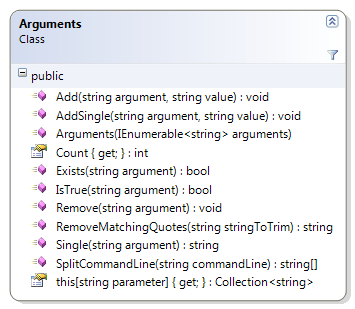
Example Usage
There are two ways you can start using this class, I have created a SplitCommandLine function which ignores escaped quotes, this is needed for path support, the trailing \ on the path causes the quote to be taken literally.
Using SplitCommandLine:
var commandLine = Environment.CommandLine;
var splitCommandLine = Arguments.SplitCommandLine(commandLine);

var arguments = new Arguments(splitCommandLine);
Letting windows do it:
static int Main(string[] args)
{
    _args = new Arguments(args);
}
Example Arguments
Argument: –flag
Usage: args.IsTrue(“flag”);
Result: trueArgument: –arg:MyValue
Usage: args.Single(“arg”);
Result: MyValueArgument: –arg “My Value”
Usage: args.Single(“arg”);
Result: ‘My Value’Argument: /arg=Value /arg=Value2
Usage: args[“arg”]
Result: new string[] {“Value”, “Value2”}Argument: /arg=“Value,Value2”
Usage: args[“arg”]
Result: new string[] {“Value”, “Value2”}
As you can see it is very flexible, it support [–/]arg[:=
I have tried to cover as many of the different options with unit tests to make sure it is robust.
Arguments Class
/// <summary>
/// Arguments class
/// </summary>
public class Arguments
{
/// <summary>
/// Splits the command line. When main(string[] args) is used escaped quotes (ie a path "c:\folder\")
/// Will consume all the following command line arguments as the one argument.
/// This function ignores escaped quotes making handling paths much easier.
/// </summary>
/// <param name="commandLine">The command line.</param>
/// <returns></returns>
public static string[] SplitCommandLine(string commandLine)
{
var translatedArguments = new StringBuilder(commandLine);
var escaped = false;
for (var i = 0; i < translatedArguments.Length; i++)
{
if (translatedArguments[i] == '"')
{
escaped = !escaped;
}
if (translatedArguments[i] == ' ' && !escaped)
{
translatedArguments[i] = '\n';
}
}
var toReturn = translatedArguments.ToString().Split(new[] { '\n' }, StringSplitOptions.RemoveEmptyEntries);
for (var i = 0; i < toReturn.Length; i++)
{
toReturn[i] = RemoveMatchingQuotes(toReturn[i]);
}
return toReturn;
}
public static string RemoveMatchingQuotes(string stringToTrim)
{
var firstQuoteIndex = stringToTrim.IndexOf('"');
var lastQuoteIndex = stringToTrim.LastIndexOf('"');
while (firstQuoteIndex != lastQuoteIndex)
{
stringToTrim = stringToTrim.Remove(firstQuoteIndex, 1);
stringToTrim = stringToTrim.Remove(lastQuoteIndex - 1, 1); //-1 because we've shifted the indicies left by one
firstQuoteIndex = stringToTrim.IndexOf('"');
lastQuoteIndex = stringToTrim.LastIndexOf('"');
}
return stringToTrim;
}
private readonly Dictionary<string, Collection<string>> _parameters;
private string _waitingParameter;
public Arguments(IEnumerable<string> arguments)
{
_parameters = new Dictionary<string, Collection<string>>();
string[] parts;
//Splits on beginning of arguments ( - and -- and / )
//And on assignment operators ( = and : )
var argumentSplitter = new Regex(@"^-{1,2}|^/|=|:",
RegexOptions.IgnoreCase | RegexOptions.Compiled);
foreach (var argument in arguments)
{
parts = argumentSplitter.Split(argument, 3);
switch (parts.Length)
{
case 1:
AddValueToWaitingArgument(parts[0]);
break;
case 2:
AddWaitingArgumentAsFlag();
//Because of the split index 0 will be a empty string
_waitingParameter = parts[1];
break;
case 3:
AddWaitingArgumentAsFlag();
//Because of the split index 0 will be a empty string
string valuesWithoutQuotes = RemoveMatchingQuotes(parts[2]);
AddListValues(parts[1], valuesWithoutQuotes.Split(','));
break;
}
}
AddWaitingArgumentAsFlag();
}
private void AddListValues(string argument, IEnumerable<string> values)
{
foreach (var listValue in values)
{
Add(argument, listValue);
}
}
private void AddWaitingArgumentAsFlag()
{
if (_waitingParameter == null) return;
AddSingle(_waitingParameter, "true");
_waitingParameter = null;
}
private void AddValueToWaitingArgument(string value)
{
if (_waitingParameter == null) return;
value = RemoveMatchingQuotes(value);
Add(_waitingParameter, value);
_waitingParameter = null;
}
/// <summary>
/// Gets the count.
/// </summary>
/// <value>The count.</value>
public int Count
{
get
{
return _parameters.Count;
}
}
/// <summary>
/// Adds the specified argument.
/// </summary>
/// <param name="argument">The argument.</param>
/// <param name="value">The value.</param>
public void Add(string argument, string value)
{
if (!_parameters.ContainsKey(argument))
_parameters.Add(argument, new Collection<string>());
_parameters[argument].Add(value);
}
public void AddSingle(string argument, string value)
{
if (!_parameters.ContainsKey(argument))
_parameters.Add(argument, new Collection<string>());
else
throw new ArgumentException(string.Format("Argument {0} has already been defined", argument));
_parameters[argument].Add(value);
}
public void Remove(string argument)
{
if (_parameters.ContainsKey(argument))
_parameters.Remove(argument);
}
/// <summary>
/// Determines whether the specified argument is true.
/// </summary>
/// <param name="argument">The argument.</param>
/// <returns>
/// <c>true</c> if the specified argument is true; otherwise, <c>false</c>.
/// </returns>
public bool IsTrue(string argument)
{
AssertSingle(argument);
var arg = this[argument];
return arg != null && arg[0].Equals("true", StringComparison.OrdinalIgnoreCase);
}
private void AssertSingle(string argument)
{
if (this[argument] != null && this[argument].Count > 1)
throw new ArgumentException(string.Format("{0} has been specified more than once, expecting single value", argument));
}
public string Single(string argument)
{
AssertSingle(argument);
//only return value if its NOT true, there is only a single item for that argument
//and the argument is defined
if (this[argument] != null && !IsTrue(argument))
return this[argument][0];
return null;
}
public bool Exists(string argument)
{
return (this[argument] != null && this[argument].Count > 0);
}
/// <summary>
/// Gets the <see cref="System.Collections.ObjectModel.Collection<T>"/> with the specified parameter.
/// </summary>
/// <value></value>
public Collection<string> this[string parameter]
{
get
{
return _parameters.ContainsKey(parameter) ? _parameters[parameter] : null;
}
}
}
Unit Tests
Tests use xUnit as the unit testing framework
public class ArgumentsTests
{
    [Fact]
    public void ArgumentBooleanTest()
    {
        IEnumerable<string> args = new[]
                                       {
                                           "-testBool"
                                       };
        var target = new Arguments(args);
        Assert.True(target.IsTrue("testBool"));
    }

    [Fact]
    public void IsTrueDoesntExist()
    {
        IEnumerable<string> args = new string[]{};
        var target = new Arguments(args);
        Assert.False(target.IsTrue("doesntExist"));
    }

    [Fact]
    public void ArgumentDoubleDashesTest()
    {
        IEnumerable<string> args = new[]
                                       {
                                           "--testArg=Value"
                                       };
        var target = new Arguments(args);
        Assert.Equal("Value", target.Single("testArg"));
    }

    [Fact]
    public void ArgumentSingleTest()
    {
        IEnumerable<string> args = new[]
                                       {
                                           "-test:Value"
                                       };
        var target = new Arguments(args);
        Assert.Equal(1, target["test"].Count);
        Assert.Equal("Value", target.Single("test"));
    }

    [Fact]
    public void ArgumentWithSpaceSeparatorTest()
    {
        IEnumerable<string> args = Arguments.SplitCommandLine("-test Value");

        var target = new Arguments(args);
        Assert.Equal(1, target["test"].Count);
        Assert.Equal("Value", target.Single("test"));
    }

    [Fact]
    public void ArgumentWithSpaceSeparatorAndSpaceInValueTest()
    {
        IEnumerable<string> args = Arguments.SplitCommandLine("-test \"Value With Space\"");

        var target = new Arguments(args);
        Assert.Equal(1, target["test"].Count);
        Assert.Equal("Value With Space", target.Single("test"));
    }

    [Fact]
    public void AddWaitingAsFlagTest()
    {
        IEnumerable<string> args = Arguments.SplitCommandLine("-flag -test \"Value With Space\"");

        var target = new Arguments(args);
        Assert.Equal(2, target.Count);
        Assert.Equal(1, target["test"].Count);
        Assert.Equal("Value With Space", target.Single("test"));
        Assert.True(target.IsTrue("flag"));
    }

    [Fact]
    public void AddSingleTwiceTest()
    {
        IEnumerable<string> args = Arguments.SplitCommandLine("-flag");

        var target = new Arguments(args);

        Assert.Throws<ArgumentException>(() => target.AddSingle("flag", "true"));
    }

    [Fact]
    public void FlagsTest()
    {
        IEnumerable<string> args = Arguments.SplitCommandLine("-flag1 -flag2");

        var target = new Arguments(args);

        Assert.True(target.IsTrue("flag1"));
        Assert.True(target.IsTrue("flag2"));
    }

    [Fact]
    public void RemoveTest()
    {
        IEnumerable<string> args = Arguments.SplitCommandLine("-flag1 -flag2");

        var target = new Arguments(args);

        Assert.True(target.IsTrue("flag1"));
        Assert.True(target.IsTrue("flag2"));
        target.Remove("flag1");
        Assert.False(target.Exists("flag1"));
        Assert.True(target.IsTrue("flag2"));
    }

    [Fact]
    public void SingleReturnsNullIfNotDefinedTest()
    {

        var target = new Arguments(new string[]{});

        Assert.False(target.Exists("notDefined"));
        Assert.Null(target.Single("notDefined"));
    }

    [Fact]
    public void ExistsTest()
    {
        IEnumerable<string> args = Arguments.SplitCommandLine("-flag1");

        var target = new Arguments(args);

        Assert.True(target.Exists("flag1"));
    }

    [Fact]
    public void ArgumentListTest()
    {
        IEnumerable<string> args = new[]
                                       {
                                           "-test:Value",
                                           "-test:Value2"
                                       };
        var target = new Arguments(args);
        Assert.Equal(2, target["test"].Count);
        Assert.Equal("Value", target["test"][0]);
        Assert.Equal("Value2", target["test"][1]);
    }

    [Fact]
    public void ArgumentPathTest()
    {
        IEnumerable<string> args = new[]
                                       {
                                           "-test:Value",
                                           @"-test:C:\Folder\"
                                       };
        var target = new Arguments(args);
        Assert.Equal(2, target["test"].Count);
        Assert.Equal("Value", target["test"][0]);
        Assert.Equal(@"C:\Folder\", target["test"][1]);
    }

    [Fact]
    public void ArgumentQuotedPathTest()
    {
        IEnumerable<string> args = new[]
                                       {
                                           "-test:Value",
                                           "-test:\"C:\\Folder\\\""
                                       };
        var target = new Arguments(args);
        Assert.Equal(2, target["test"].Count);
        Assert.Equal("Value", target["test"][0]);
        Assert.Equal("C:\\Folder\\", target["test"][1]);
    }

    [Fact]
    public void ArgumentQuotedPathWithSpaceTest()
    {
        IEnumerable<string> args = new[]
                                       {
                                           "-test:Value",
                                           "-test:\"C:\\Folder Name\\\""
                                       };
        var target = new Arguments(args);
        Assert.Equal(2, target["test"].Count);
        Assert.Equal("Value", target["test"][0]);
        Assert.Equal("C:\\Folder Name\\", target["test"][1]);
    }

    [Fact]
    public void ArgumentQuotedPathWithSpaceAndFollowingArgTest()
    {
        IEnumerable<string> args = new[]
                                       {
                                           "-test:Value",
                                           "-test:\"C:\\Folder Name\\\"",
                                           "-testPath:\"C:\\Folder2\\\"",
                                           "-boolArg"
                                       };

        var target = new Arguments(args);
        Assert.Equal(2, target["test"].Count);
        Assert.Equal(@"C:\Folder2\", target.Single("testPath"));
        Assert.True(target.IsTrue("boolArg"));

        Assert.Equal("Value", target["test"][0]);
        Assert.Equal("C:\\Folder Name\\", target["test"][1]);
    }

    [Fact]
    public void ArgumentListRequestSingleThrowsExceptionTest()
    {
        IEnumerable<string> args = new[]
                                       {
                                           "-test:Value",
                                           "-test:Value2"
                                       };

        var target = new Arguments(args);
        //Should throw Argument exception because test is defined more than once
        Assert.Throws<ArgumentException>(() => target.Single("test"));
    }

    [Fact]
    public void ArgumentCommaListTest()
    {
        IEnumerable<string> args = new[]
                                       {
                                           "-testList:Value,Value2,Value3"
                                       };

        var target = new Arguments(args);
        Assert.Equal(3, target["testList"].Count);

        Assert.Equal("Value", target["testList"][0]);
        Assert.Equal("Value2", target["testList"][1]);
        Assert.Equal("Value3", target["testList"][2]);
    }

    [Fact]
    public void BlogExample()
    {
        const string commandLine = "-u -d -mdb=\"c:\\entries.mdb\" -xml=\"j:\\\"";

        var target = new Arguments(Arguments.SplitCommandLine(commandLine));

        Assert.Equal("c:\\entries.mdb", target.Single("mdb"));
        Assert.Equal("j:\\", target.Single("xml"));
    }
}