Many of the apps I have written need to target multiple databases or I want the connection to be configurable by the user. I have a user control in my common library that I use all the time to let the user connect to a database.
You will need the Sql Management Objects from http://www.microsoft.com/Downloads/details.aspx?familyid=B33D2C78-1059-4CE2-B80D-2343C099BCB4&displaylang=en to compile the demo project.
Features:
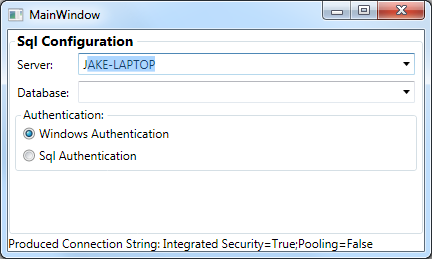
- Finds database instances on your Lan, these are stored statically so will only be loaded once during the application lifetime.
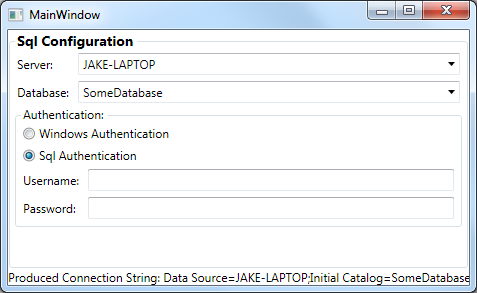
- Will populate the databases on that SQL server.
- Is easily extendable, you can expose other options within the control if you want.
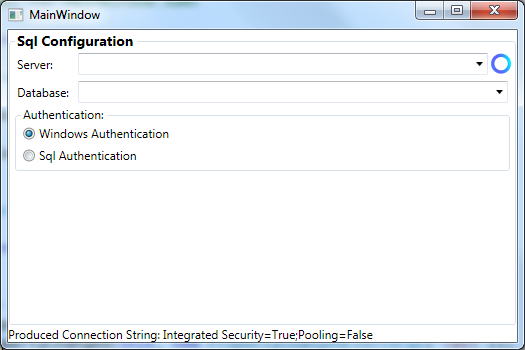
- Has a cool little loading circle I built included
- It uses a SqlConnectionString object which is much nicer than dealing with a SqlConnectionStringBuilder or a string. SqlConnectionString is also implicitly converts to a string so you can pass it directly to your SqlConnection constructor without .ToString() or casting.
- Also validates against SQL Compact databases
All in all, for small apps I think this makes connecting to a SQL database really easy! The SqlConnectionString class is also handy for any type of apps that have to manipulate a Sql Connection String.
SqlConnectionString Class
At the core of this user control is a SqlConnectionString
public class SqlConnectionString : INotifyPropertyChanged
{
    private readonly SqlConnectionStringBuilder _builder = new SqlConnectionStringBuilder
                                                               {
                                                                   Pooling = false,
                                                                   IntegratedSecurity = true
                                                               };

    public SqlConnectionString()
    { }

    public SqlConnectionString(string connectionString)
    {
        _builder.ConnectionString = connectionString;
    }

    public static implicit operator string(SqlConnectionString connectionString)
    {
        return connectionString.ToString();
    }

    public override string ToString()
    {
        if (Server.EndsWith(".sdf"))
            if (string.IsNullOrEmpty(Password))
                return new SqlConnectionStringBuilder {DataSource = Server}.ConnectionString;
            else
                return new SqlConnectionStringBuilder {DataSource = Server, Password = Password}.
                    ConnectionString;

        return _builder.ConnectionString;
    }

    /// <summary>
    /// Creates a copy of this connection string with the specified database instead of the current
    /// </summary>
    /// <param name="databaseName">Name of the database.</param>
    /// <returns></returns>
    public SqlConnectionString WithDatabase(string databaseName)
    {
        return new SqlConnectionString
                   {
                       Server = Server,
                       Database = databaseName,
                       IntegratedSecurity = IntegratedSecurity,
                       UserName = UserName,
                       Password = Password,
                       Pooling = Pooling
                   };
    }

    public string Server
    {
        get
        {
            return _builder.DataSource;
        }
        set
        {
            if (_builder.DataSource == value) return;
            _builder.DataSource = value;
            OnPropertyChanged("Server");
            OnPropertyChanged("IsValid");
        }
    }

    public string Database
    {
        get
        {
            return _builder.InitialCatalog;
        }
        set
        {
            if (_builder.InitialCatalog == value) return;
            _builder.InitialCatalog = value;
            OnPropertyChanged("Database");
            OnPropertyChanged("IsValid");
        }
    }

    public string UserName
    {
        get
        {
            return _builder.UserID;
        }
        set
        {
            if (_builder.UserID == value) return;
            _builder.UserID = value;
            OnPropertyChanged("UserName");
            OnPropertyChanged("IsValid");
        }
    }

    public bool Pooling
    {
        get
        {
            return _builder.Pooling;
        }
        set
        {
            if (_builder.Pooling == value) return;
            _builder.Pooling = value;
            OnPropertyChanged("Pooling");
            OnPropertyChanged("IsValid");
        }
    }

    public int ConnectionTimeout
    {
        get
        {
            return _builder.ConnectTimeout;
        }
        set
        {
            if (_builder.ConnectTimeout == value) return;
            _builder.ConnectTimeout = value;
            OnPropertyChanged("ConnectionTimeout");
            OnPropertyChanged("IsValid");
        }
    }

    public string Password
    {
        get
        {
            return _builder.Password;
        }
        set
        {
            if (_builder.Password == value) return;
            _builder.Password = value;
            OnPropertyChanged("Password");
            OnPropertyChanged("IsValid");
        }
    }

    public bool IntegratedSecurity
    {
        get
        {
            return _builder.IntegratedSecurity;
        }
        set
        {
            if (_builder.IntegratedSecurity == value) return;
            _builder.IntegratedSecurity = value;
            OnPropertyChanged("IntegratedSecurity");
            OnPropertyChanged("IsValid");
        }
    }

    public bool IsValid()
    {
        return
            (!string.IsNullOrEmpty(Server) && Server.EndsWith(".sdf")) ||
            (!string.IsNullOrEmpty(Server) &&
             !string.IsNullOrEmpty(Database) &&
             (IntegratedSecurity || (!string.IsNullOrEmpty(UserName) && !string.IsNullOrEmpty(Password))));
    }

    private void OnPropertyChanged(string propertyName)
    {
        if (PropertyChanged == null) return;

        PropertyChanged(this, new PropertyChangedEventArgs(propertyName));
    }

    public event PropertyChangedEventHandler PropertyChanged;
}
This is really our model, and this is what you will bind the ConnectionString dependency property on the usercontrol to.
SqlConnectionStringBuilder UserControl
Using this user control is pretty simple.
<WpfApplication1:SqlConnectionStringBuilder ConnectionString="{Binding ElementName=_this, Path=TestConnection}" />
Other classes
The Sql Management Objects functionality is injected through a ISmoTasks interface. So the user control could be unit tested if needed.
public interface ISmoTasks
{
    IEnumerable<string> SqlServers {get;}
    List<string> GetDatabases(SqlConnectionString connectionString);
    List<DatabaseTable> GetTables(SqlConnectionString connectionString);
}
DatabaseTable
Although not needed for this user control the GetTables method was already in there for other reasons, so I have left it in there.
Source Code
Source is on GitHub - https://github.com/JakeGinnivan/SqlConnectionControl